
Why Twitter for Threat Intelligence? #
If you spend time in the cybersecurity space, you probably know that Twitter (or X) is still one of the fastest places to find fresh threat data. Security researchers and accounts like @malwrhunterteam and @abuse_ch regularly share new malware samples, active C2 IP addresses, and phishing URLs before they appear in formal threat feeds.
However, gathering this data manually gets repetitive very quickly:
- You scroll through accounts to find tweets containing indicators.
- You copy defanged text like
hxxps://example[.]comor103.193.173[.]83. - You open VirusTotal, AlienVault OTX, AbuseIPDB, or MalwareBazaar.
- You clean up the text, paste it into each search bar, check the reputation, and save the notes.
Doing this for one or two tweets is fine. Doing it every day for dozens of tweets takes a lot of time that could be spent on actual analysis.
To solve this, I built a small, modular Python pipeline that handles the whole workflow automatically: crawling target accounts, extracting and defanging IOCs, querying threat intelligence platforms, and saving everything in a structured format.
How the Pipeline Works #
The project is split into two simple stages:
- Crawler Stage (
crawler.py): Uses Selenium to open Twitter accounts, scroll the timeline, and extract hashes, IP addresses, and URLs. - Enrichment Stage (
tip.py): Takes the collected IOCs and looks them up across VirusTotal, AlienVault OTX, MalwareBazaar, and AbuseIPDB.
Here is a simple diagram showing the flow:
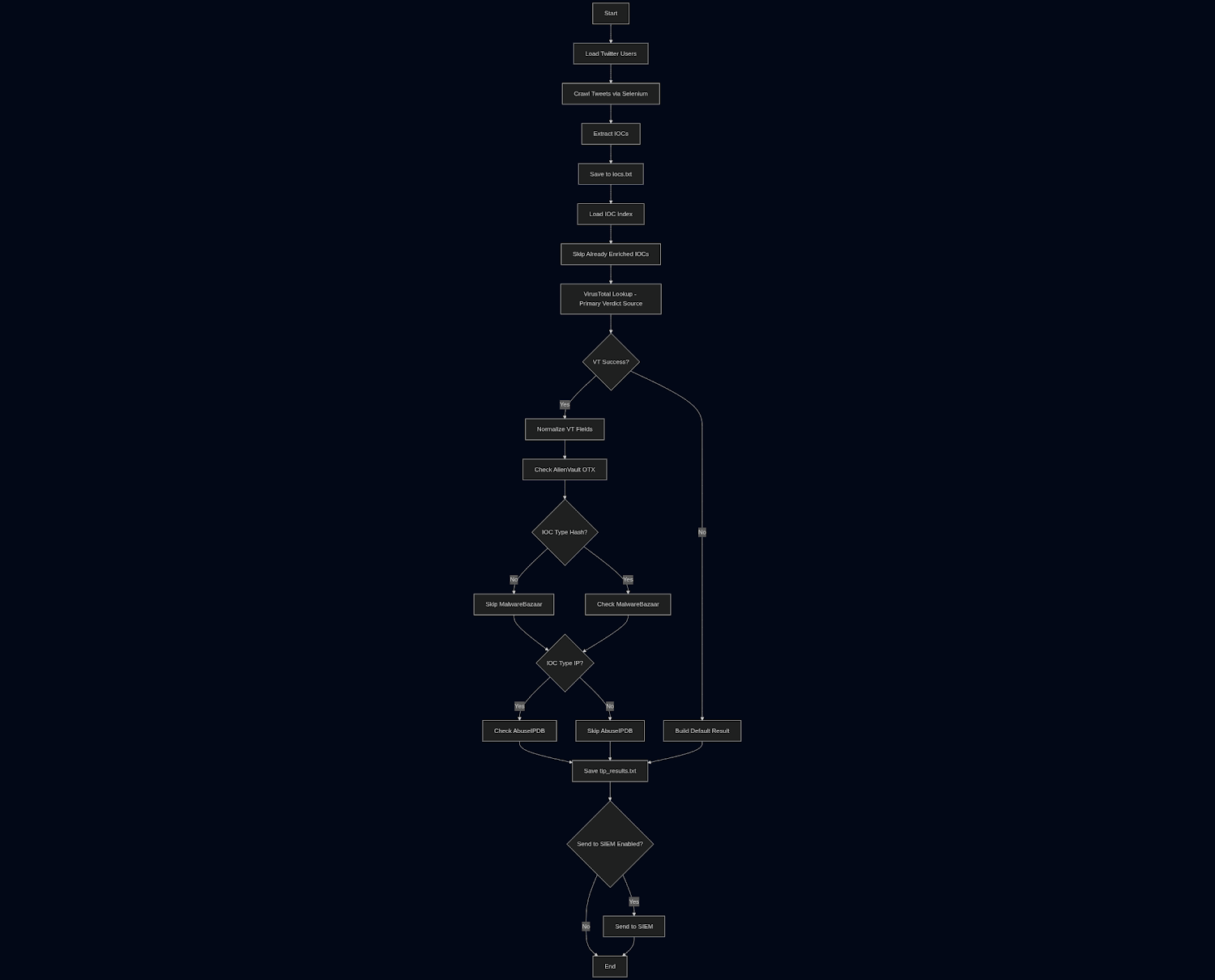
The basic flow looks like this:
[ Twitter Accounts in twitter_users.txt ]
                  │
                  ▼
         [ crawler.py ]
   (Extracts & Defangs IOCs)
                  │
                  ▼
             [ iocs.txt ]
                  │
                  ▼
            [ tip.py ]
   (Queries VT, OTX, MB, AbuseIPDB)
                  │
                  ▼
         [ tip_results.txt ]
                  │
                  ▼
     [ Optional SIEM Ingestion ]
Stage 1: Scraping and Parsing Tweets #
1. Handling Authentication with Cookies #
Twitter no longer allows easy public browsing without an account. Rather than dealing with API fees, the script uses Selenium with Chrome in headless mode and injects standard session cookies (auth_token and ct0) from a logged-in account.
opts = Options()
opts.add_argument("--headless=new")
opts.add_argument("--window-size=1920,1080")
opts.add_argument("--user-agent=Mozilla/5.0 (X11; Linux x86_64) AppleWebKit/537.36...")
opts.add_argument("--disable-blink-features=AutomationControlled")
opts.add_experimental_option("excludeSwitches", ["enable-automation"])
Setting a realistic desktop user agent and disabling automation flags is important here, otherwise Twitter's bot protection returns an HTTP 403 error before the page even loads.
2. Defanging and Extracting IOCs #
Researchers on Twitter defang links so users do not accidentally click them. Common examples include:
hxxp://orhxxps://instead ofhttp://orhttps://1.1.1[.]1or1.1.1(.)1http[:]//
Before applying regex, the parser normalizes the text back to standard format:
def normalize(text: str) -> str:
    text = re.sub(r'hxxp(s?)://', r'http\1://', text, flags=re.IGNORECASE)
    text = text.replace("[.]", ".").replace("(.)", ".").replace("[:]", ":")
    return text
Then, regular expressions pull out SHA256 hashes, IPv4 addresses, and URLs. New indicators are saved to iocs.txt along with the source tweet link so you always know where an IOC came from.
Stage 2: Threat Intelligence Platform (TIP) Enrichment #
Once iocs.txt has new indicators, the enrichment script takes over. It checks the type of each IOC and queries the right services:
| Platform | Supported Types | Data We Collect |
|---|---|---|
| VirusTotal | Hash, IP, URL | Malicious score and last analysis date |
| AlienVault OTX | Hash, IP, URL | Threat pulse counts and reference links |
| MalwareBazaar | Hash (SHA256) | Malware signature (e.g. AdaptixC2, AgentTesla) and intel count |
| AbuseIPDB | IPv4 | Abuse confidence score, report count, and domain |
Managing API Rate Limits #
Public API keys often have rate limits (for example, VirusTotal allows 4 requests per minute on free accounts). The script includes a configurable sleep timer between lookups and checks existing results first so it never wastes API calls on IOCs that were already enriched.
What the Output Looks Like #
When you run the pipeline:
python3 main.py --tweets 5
The script prints clean, readable progress in your terminal and writes it to twitter_ioc_crawler_log.txt:
2026-09-05 17:28:10 | INFO    | =================================================================
2026-09-05 17:28:10 | INFO    | [*] STAGE 1: TWITTER IOC CRAWLER STARTED
2026-09-05 17:28:10 | INFO    | =================================================================
2026-09-05 17:28:10 | INFO    | [+] Target accounts loaded: 2 ['malwrhunterteam', 'abuse_ch']
2026-09-05 17:28:10 | INFO    | [1/2] Crawling timeline of @malwrhunterteam
2026-09-05 17:28:23 | INFO    |   [+] New IOC collected: [HASH] d8b6088156477df342a5387bc81aef1e...
2026-09-05 17:28:44 | INFO    | =================================================================
2026-09-05 17:28:44 | INFO    | [*] STAGE 2: THREAT INTELLIGENCE PLATFORM (TIP) ENRICHMENT STARTED
2026-09-05 17:28:44 | INFO    | =================================================================
2026-09-05 17:28:44 | INFO    | [1/1] Enriching [HASH] d8b6088156477df342a5387bc81aef1e...
2026-09-05 17:28:44 | INFO    |   ├─ VirusTotal    : Malicious Score = 52 | Last Analysis = 2026-08-27
2026-09-05 17:28:46 | INFO    |   ├─ AlienVault OTX: Pulses = 1
2026-09-05 17:28:47 | INFO    |   ├─ MalwareBazaar : Signature = AdaptixC2 | Intel Count = 13
2026-09-05 17:28:47 | INFO    |   └─ Status        : Saved to tip_results.txt
The final output is saved to tip_results.txt in a pipe-separated format that is easy to import into Excel, a SIEM, or a database:
twitter_link | https://x.com/malwrhunterteam/status/2082080091786313891
ioc          | d8b6088156477df342a5387bc81aef1e242f12d2f722e5e2030cbc51c203d547
ioc_type     | hash
vt_score     | 52
signature    | AdaptixC2
vendor_intel | 13
Lessons Learned While Building This #
A few practical things came up during development that are worth noting if you build something similar:
- Selenium Anti-Detection: Standard headless Chrome gets blocked by Cloudflare and Twitter immediately. Adding
--disable-blink-features=AutomationControlledand a real user-agent string solved the issue. - Matching Dictionary Keys: At one point, AlienVault results were returning
alienvault_pulse_count, but the saving function expectedalienvault_pulse_info_count. Because no error was raised, the column stayed blank in the output file until I caught the naming mismatch. - Structured Logging: Raw print statements get messy fast when multiple APIs are involved. Formatting logs with simple tree branches (
├─,└─) and step counters ([1/5]) makes following the progress much easier.
Conclusion #
This project started as a way to cut down on repetitive manual lookups, and it turned into a reliable little tool for daily threat monitoring. You can set it to run on a schedule, add your favorite researcher accounts to twitter_users.txt, and let it collect and enrich data in the background.
Feel free to check out the code below, tweak the regex patterns, or plug in additional threat intel providers.
primasr's Github - Twitter IOC Crawler
Happy hunting!